 iPad
iPadWhiteboards
Think out loud.
An endless canvas for stickies, shapes, arrows, pasted images, and ink — all on one surface.
CLOUDOne notebook on iPad, iPhone, and the web.
Whiteboards, notes, and PDFs that live in the cloud — write with Apple Pencil on iPad, pick up on your phone or any browser. Then circle anything and ask; the answer lands right on your page.
iPad · iPhone · Web — saved to your account as you write — bring your own AI key
What it shows — reaction rate v against substrate concentration [S].
The trend — v climbs steeply, then levels off toward Vmax.
Why it flattens — every active site is busy, so more substrate can’t make it faster.
Takeaway — Km is the [S] at ½ Vmax. Lower Km, tighter binding.
The trend — v climbs steeply, then levels off toward Vmax.
Why it flattens — every active site is busy.
Synced · open on iPad, iPhone & web
One account. One notebook in the cloud, open on every screen at once.
Cloud-first · iPad · iPhone · Web
Handwriting apps keep losing people’s notebooks — to a bad update, a backup that quietly stopped, a tablet left on a train. Vinnote started from the other end: your pages live in your account, and every screen opens the same notebook.
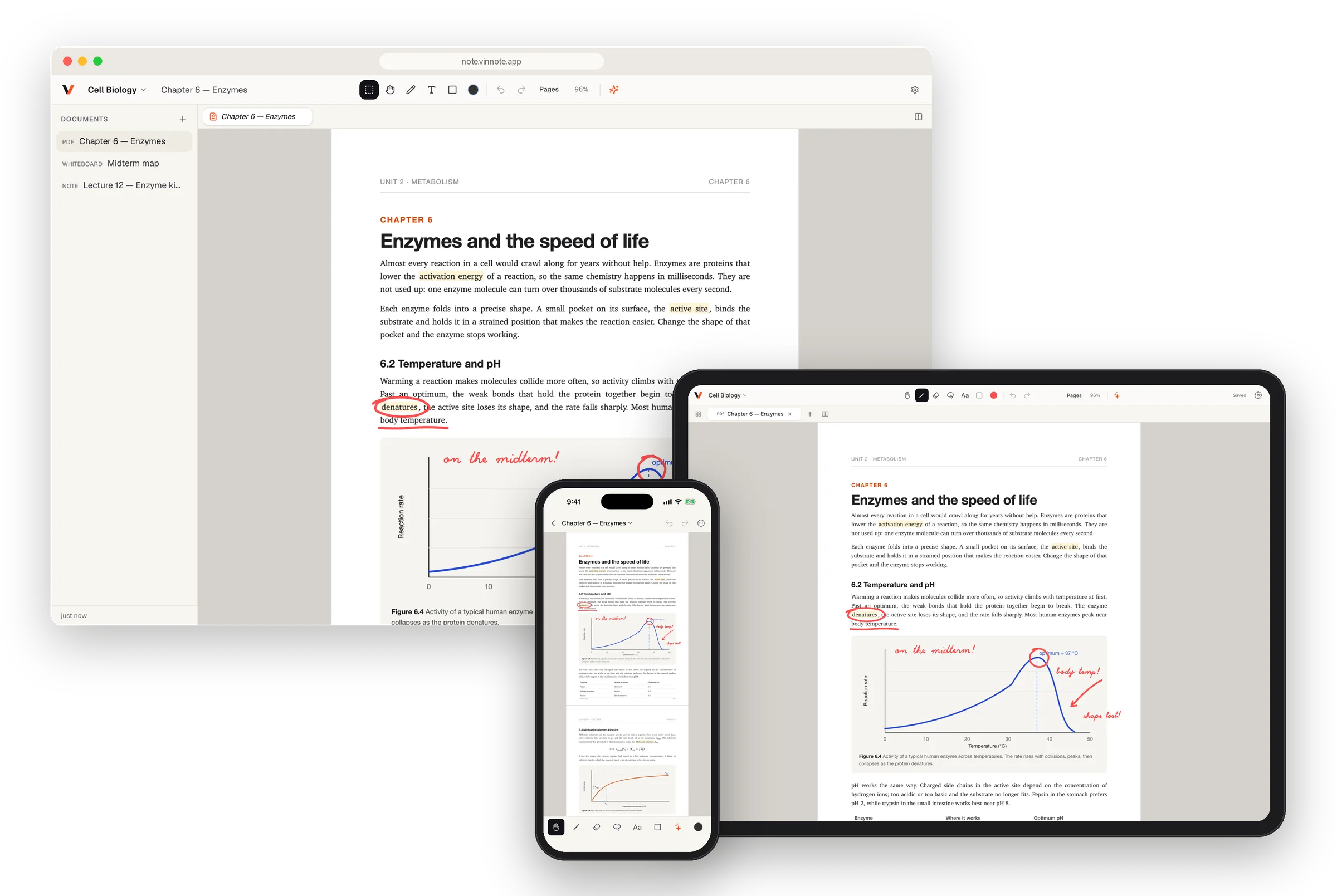
Every page goes to your account while you work. No export, no backup to schedule, no “did it sync?”.
Open a page on iPad and in a browser at once. Ink from one shows up on the other within seconds.
Pages you’ve opened stay on the device. Edits made on a plane go up the moment you’re back online.
Lost or broke your iPad? Sign in on the next one and every workspace is already there.
Whiteboards · Notes · PDFs
Plan on a whiteboard, take notes on paper pages, and write straight on your PDFs. Keep them side by side in tabs or split view — and on every device, like everything else.
iPadWhiteboards
An endless canvas for stickies, shapes, arrows, pasted images, and ink — all on one surface.
 Web
WebNotes
Pages that flow like a notebook. Write an equation by hand and type the summary right under it.
 iPad
iPadPDFs
Textbooks, papers, slides, contracts. Import one and mark it up like paper — then ask about any part of it.
How it works
No copying into a chat window. No losing your place. The question starts where you’re reading — and the answer stays there.
Lasso a figure, a paragraph, an equation, or your own scribbles — on a PDF or a blank board. Even a scan with no text layer.
Vinnote suggests what fits the selection: explain the chart, give a hint, tidy the handwriting, translate. Or just type your own question.
Place the answer beside your notes, copy it, or save it into the PDF. Every reply stays with the document for next time.
Smart suggestions
A chart, your handwriting, a math problem, a wall of sticky notes — Vinnote reads the selection and offers the right next step. One tap.
Suggested for a chart
Explain chart or table
What it shows — quarterly revenue in $M, Q1 to Q4.
The trend — up every quarter, from $1.2M to $2.1M (+75%).
Biggest jump — Q3 → Q4, an extra $0.5M.
Takeaway — growth is speeding up into year-end.
Or skip the suggestions and type any question about what you circled.
Features
A real pen-and-paper notebook first — fast ink, PDFs, endless boards, synced everywhere — with an assistant that only speaks when you ask.
Apple Pencil writes; fingers pan, pinch, and grab. A Metal renderer keeps every stroke crisp at any zoom, and the eraser trims exactly what it touches.
Read a paper, sketch beside it on a whiteboard, and keep both open in tabs or side by side.
∫₀¹ x² dx = ⅓
Table 2 · dose / response
SCANPull clean text out of scanned pages with no text layer. Tables come out as rows, math as LaTeX.
Documents open straight from your device. Edits made on the train sync the moment you’re back online.
Drag out a sticky, draw an arrow, paste a screenshot. Select a group and move or resize it as one.
Past answers on this document
Explain chart or table
Figure 7.4
Give a hint
Problem 4
Translate to Korean
§7.2, paragraph 3
Every reply is saved with its document. Reopen past answers any time, or pin one to the page as a note.
Who it’s for
Ask for a hint instead of the answer. Have your working checked line by line. Turn tonight’s chapter into a quiz before the exam.
Have a figure explained in plain words, lift tables out of scanned PDFs, and translate a paragraph without leaving the page.
Mark up a contract or a deck, turn meeting scrawl into clean notes, and pull out who does what by when.
Ask with the model you already trust — using your own key.
Privacy
Vinnote is a notebook first. The AI is a guest that only sees what you hand it. Read the privacy policy.
Add a key from Anthropic, OpenAI, Google Gemini, or xAI and pick the model. It’s sealed on our server and used only to make your request.
A question sends the region you selected — or, with nothing selected, the text on screen — to the provider you chose. Nothing else from your notebook.
We don’t sell your data, and we don’t train models on your pages. Your notes are yours.
iPad and iPhone through the App Store, and any modern browser at note.vinnote.app. One account, the same workspaces everywhere.
Yes. Open the same document on both and edits from one appear on the other within a few seconds. There is nothing to export, import, or merge.
Nothing. Your pages live in your Vinnote account, not only on the device. Sign in on a new iPad, iPhone, or browser and every workspace is there.
No. With a Pencil, the Pencil writes and your fingers pan and zoom. Without one, your finger draws and two fingers pan. On iPhone, everything works by touch.
Add an API key from Anthropic, OpenAI, Google Gemini, xAI in Settings and choose a model. When you ask, Vinnote sends your selection to that provider with your key. The notebook itself works fine without a key.
Yes. Lasso any part of a scan and choose “Extract text with AI”. You get the text exactly as written — tables as rows, math as LaTeX.
Documents you’ve opened are kept on your device, so they open without a connection. Edits made offline sync as soon as you’re back online.
In your Vinnote account, so they’re on every device you sign in to. To ask what we hold or have it deleted, write to privacy@vinnote.app.
Get Vinnote for iPad and iPhone, or open it in your browser right now. Start on one screen, finish on any.
